Caneling Your Subscription
If you are receiving charges from ILookMax, you most likely subscribed directly through our website funnel and have a web subscription.
Here are the main characteristics of an ILookMax web subscription:
You paid with a card / Apple Pay / Google Pay
You subscribed after an ad seen on Facebook, Instagram, TikTok, or other platforms
The active subscription isn't visible in Apple/Google settings, but charges continue
You received a receipt or welcome email from ILookMax (not Apple/Google)
The descriptor on your bank statement says “ILookMax”, “ILOOKMAX.COM”, or a variation (not “Apple/Google payment”)
How to Cancel Your ILookMax Subscription
Open the ILookMax app (reinstall if it was deleted). Link to download: iOS
Log in with the email.
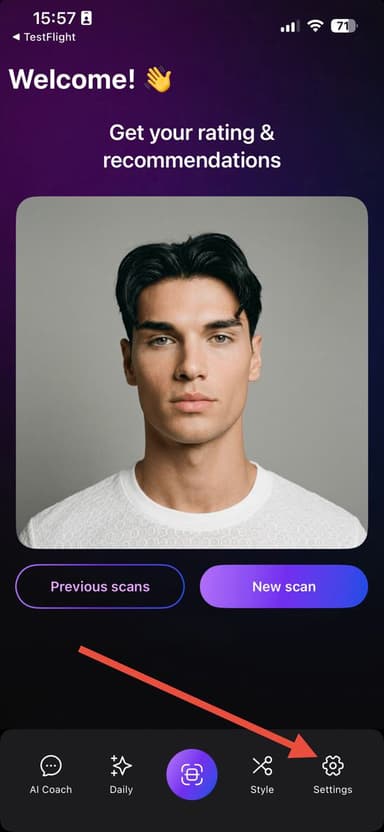
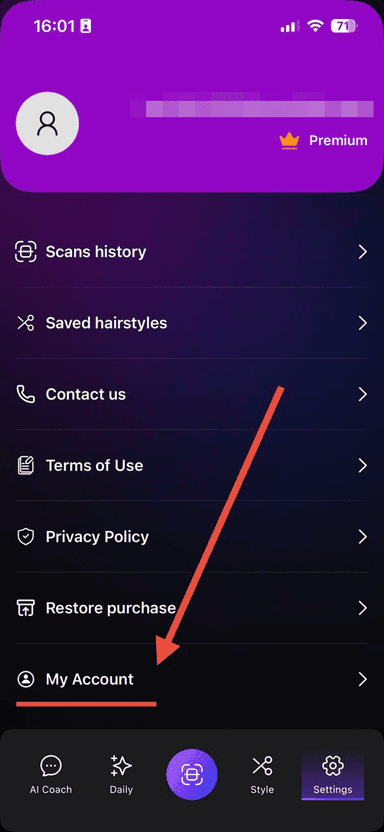
Go to Settings → My Account.
Tap “Cancel Subscription”
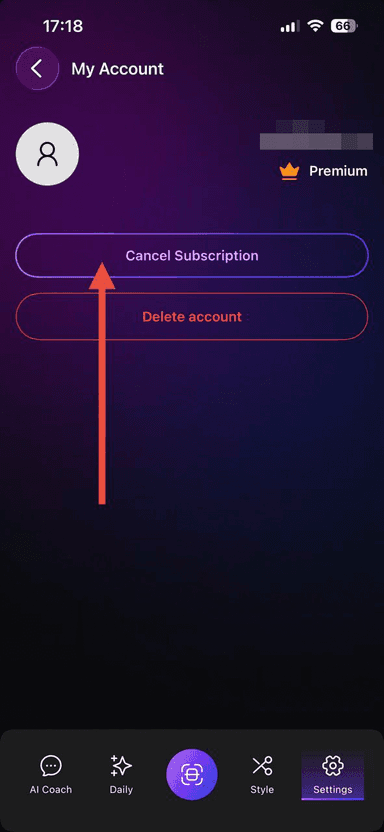
Once you cancel, your subscription will remain active until the end of the paid period, but you won't be charged again.